
Introduction
Did you know that a single missed smartphone face scan could put your college funding on hold? Navigating the Odisha Post Matric Scholarship (OSP) portal doesn’t have to be a confusing maze. Whether you are a fresh applicant or renewing your application, understanding this digital pipeline is the key to unlocking your financial aid.
By completing this lesson, you will be able to:
- Connect your National Scholarship Portal (NSP) registration with the Odisha Scholarship Portal (OSP).
- Complete secure mobile face authentication using the official OSP app.
- Navigate profile creation, including caste classification and parent profile details.
- Accurately input academic details, handle unlisted courses, and upload hosteller bonafide certificates.
- Identify which documents are required for fresh applications versus hassle-free renewals.
The Identity Gateways: NSP and Face Authentication
Before you can dive into the Odisha Scholarship Portal (OSP), you must pass through two critical digital checkpoints: National Portal registration and secure identity verification.
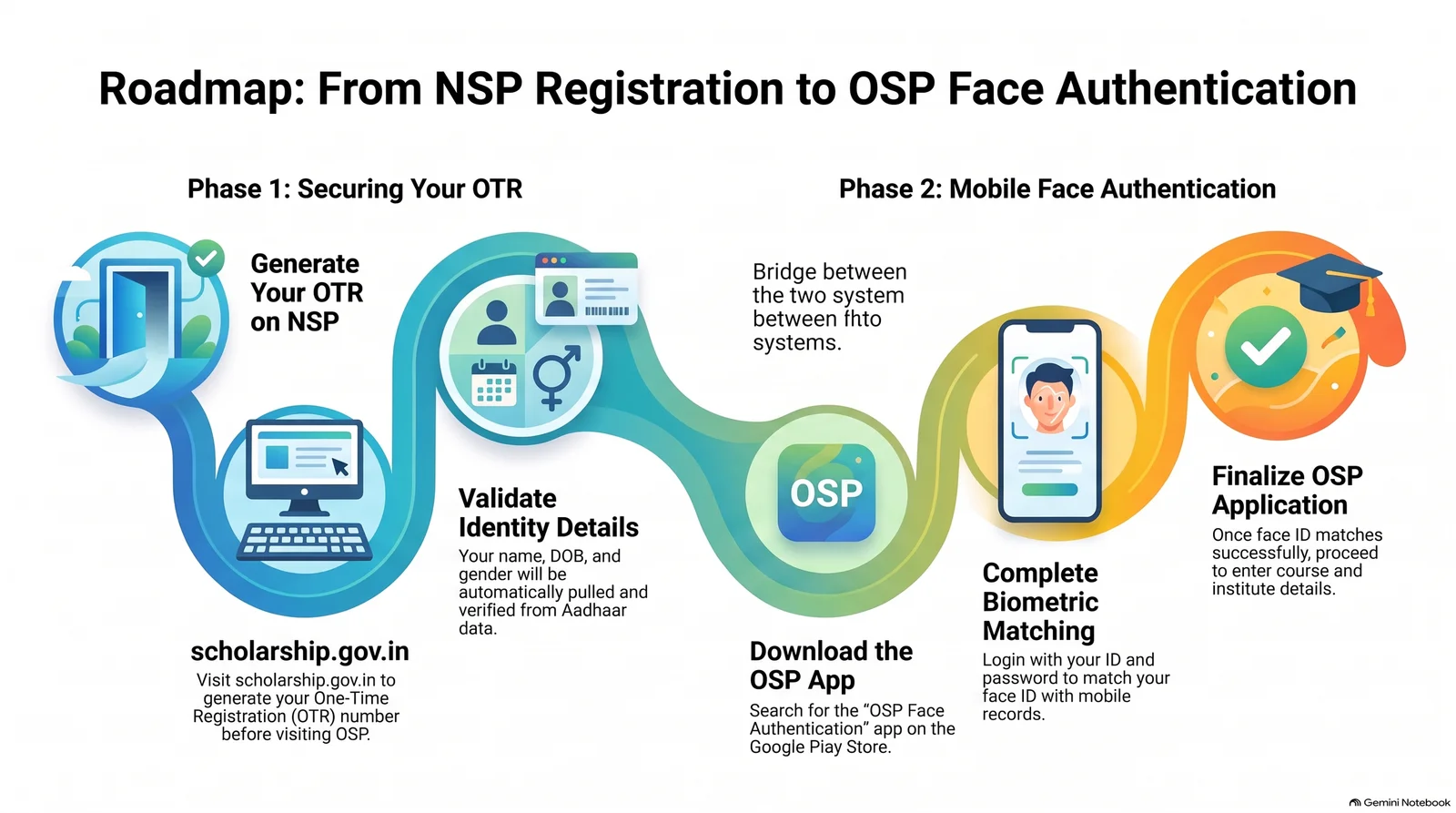
1. The NSP One-Time Registration (OTR) Your application starts at the national level. You must visit the National Scholarship Portal (scholarship.gov.in) to generate a One-Time Registration (OTR) number. The OSP will require this barcode or OTR number to fetch your verified basic details like name, date of birth, and gender automatically.
2. The OSP Face Authentication App To prevent identity fraud, OSP requires face verification. Instead of visiting an office, you complete this on your smartphone:
- Download the OSP Face Association App (or Face Authentic App) from the Google Play Store.
- Log in using your mobile number, ID, and password.
- Use your phone’s front camera to perform the face scan.
- Tip: If the scan fails, ensure you are in a well-lit room, avoid tilting your head, and try again until you see the ‘Successfully Matched’ confirmation.
Building Your Profile: Caste, Family, and Academics
Once your identity is verified, your core details (Name, DOB, Gender) will auto-populate. Now it is time to build the rest of your profile. Accuracy here prevents your application from being rejected.
Caste & Category Selections Select your category (SC, ST, OBC/SEBC) carefully from the dropdown menus. Note that the portal features a specific dropdown for State SCBC/OBC castes that might not be present on the central OBC list.
Family & Financial Demographics You must upload a valid profile photograph and declare your father’s or guardian’s occupation (such as agriculture, salaried employee, unemployed, or other specific fields).
Entering Course Information Whether you are studying within Odisha or outside the state, you must input your current education details:
- Select your district, block, and institute.
- Input your enrollment, admission, or registration number.
- What if your course isn’t listed? Do not panic! The portal allows you to send an online request directly to your institute to add the missing course or stream to their registry.
Hosteller Benefits, Documents, and Easy Renewals
The final stage involves documenting your living situation, uploading your academic history, and securing your bank details for fund transfers.
The Hosteller Bonafide Certificate Are you staying in a hostel? To claim hosteller benefits, you cannot just check a box. You must:
- Download the official Hostel Bonafide Certificate format from the portal.
- Fill out your details manually.
- Get it physically signed and sealed by your college/hostel authority.
- Scan and upload the completed document back into the eligibility section.
The Golden Rule of Renewals If you are renewing your scholarship for the same course, the process is incredibly streamlined! Your caste and income certificates uploaded in the previous year are considered non-editable and permanent. You do not need to re-upload or re-verify them.
Bank Account Integrity Double-check your bank details. You must upload a clear scan of the front page of your bank passbook. Ensure that your full name, bank account number, and IFSC code are completely legible to avoid transaction failures.


Comments